
User's Manual







English
8
6
Dual Pen
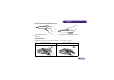
Please go to “System Setup: Basic” on the
projector OSD menu and change the
PointDraw to “Dual Pen” for dual pen
function activation. Select on QDraw
3 software and enter dual pen mode.
When switching between PointDraw
modes, it will take about 30 seconds to re-
flash modes, the delay time depends on
computer response time.
(Continued)
Point Draw
Launch QDraw
PointDraw Settings
Projector Power
Off
Single Pen
MENU
Back
When "Dual Pen" or "Single Pen" is
selected in the "System Setup: Basic >
PointDraw” projector OSD menu,
PointDraw OSD menu can be activated by
pressing on the PointDraw pen.
Launch QDraw Selecting “On” launches QDraw 3 software.
PointDraw Settings Switches between “Single Pen” mode or “Dual Pen” mode. Settings
in QDraw 3 software will be changed simultaneously.
Projector Power
Turns off the projector.
SYSTEM SETUP: Basic
Presentation Timer
Language
Projector Installation
Operation Settings
Panel Key Lock
Splash Screen
Background Color
Analog RGB
MENU
Exit
Front Table
Off
BenQ
BenQ
Menu Settings
Remote Receiver
Front+Top
PointDraw
Single Pen