
Operation Manual




28
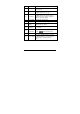
No.
Item
Description
8
AF setting
Touch to select the setting Auto Focus
(AF) / AF Lock.
9
LED/Infrared
icon
Touch to select the suitable lighting mode.
Available options: Off / On / IR
10
Scene mode
Touch to select the desired scene mode:
Available options: Auto / Night / Sports /
Landscape / Portrait / Sunset / Sand/Snow
/ Flower / Firework / Beauty
11 Time duration Indicates the recording time.
12 Battery status Indicates the remaining battery power.
13
Zoom
indicator
Indicates the zoom status.
14 Time lapse
Indicates the Time lapse recording is se
t
to 5 minutes.
15
EV
compensation
Indicates the current EV compensation.
Touch / to adjust the EV value.
16 Playback Touch to enter Playback mode.
17 Director Mode
Provide pre-defined file folders organized
by different themes, so you can store your
recorded videos and play them like a
story.