
Operation Manual


54 Playback mode
English
2. Press or to select the file that you want to protect.
3. Press > > Protect.
4. Press or to enter the submenu.
5. Press or to select Single and
press .
6. A confirmation message appears on the
screen. Press or to select Lock
and press to confirm file protection.
7. Repeat Steps 2~6 to protect other files.
To protect multiple files:
1. Press to switch to Playback mode.
2. Press > >
Protect.
3. Press or to enter the submenu.
4. Press or to select
Multi and press .
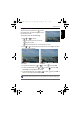
The images are displayed in thumbnail view.
5. Press or to select the files that you want to protect and press or
to mark the file for protection. A icon appears on the marked files.
6. Press to lock the selected files.
To protect all files:
1. Press to switch to Playback mode.
2. Press > >
Protect.
3. Press or to enter the submenu.
4. Press or to select
Lock All and press .
• A icon appears on the protected file.
• To unlock a protected file, select Unlock.
If the icon does not appear on the thumbnail images, this indicates the files are
not protected.
OK
OK
OK
OK
OK
OK
OK
OK
GH700 UM - EN.book Page 54 Wednesday, November 9, 2011 1:53 PM