
Operation Manual






48 Playback mode
English
Playback mode
Press to switch to Playback mode.
If the camera is turned off, you can directly switch to Playback mode by pressing and
holding .
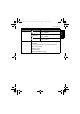
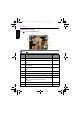
Item Description Page
reference
1 Indicates that the camera is in Playback mode. --
2 Indicates that the file is protected and cannot be
deleted.
53
3 Indicates key guide. Press the button to play the
recorded video.
--
4 Indicates this file has a voice memo or the file is an
audio file.
55
5 File number --
6 Battery status 45
7 Storage media --
8 Displays the recording information of the file. Press
to toggle between different displayed
information.
--
9 Indicates the file is marked for printing. 56
10 Image size --
10
9
1
6
7
8
234 5
GH700 UM - EN.book Page 48 Wednesday, November 9, 2011 1:53 PM