
Operation Manual




18 Touring the camera
English
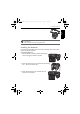
To remove the batteries:
1. Push the button up and then slide the battery/card cover
to the right to release and open it.
2. Remove the batteries.
3. Close the battery/card cover and then slide it to the left
to lock it in place.
• Turn off the camera before removing the batteries.
• Use only the specified battery type. Using other types of batteries may damage
the camera and invalidate the warranty.
• Ensure that the batteries are inserted into the product with correct polarity.
Incorrect polarity may damage the camera or cause fire.
• Download all pictures and remove the batteries from the camera if you are going
to store the camera for a long time.
• The batteries may be warm after being used. This is normal and not a malfunction.
• When using the camera in a cold environment, keep the camera and its batteries
warm by holding it inside your jacket or another warm protective environment.
• Please select the correct battery type before use (see "Battery Type" on page 50
for details).
• High-capacity (such as 2500 mAh) rechargeable batteries are recommended.
• Carbon-zinc batteries are not recommended.
• The AA batteries that came with the camera are not rechargeable.
• Do not combine old and new batteries or batteries of different makes or types.
• Performance of alkaline batteries may vary greatly depending on the manufacturer.
Choose a reliable brand.
GH600 UM - EN.book Page 18 Friday, October 14, 2011 4:33 PM