
- Benq User's Manual Monitor FP231W

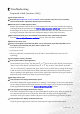
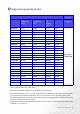


Table Of Contents
- Copyright
- Disclaimer
- Please follow these safety instructions for best performance, and long life for your m...
- Table of Contents
- Getting started
- Getting to know your Monitor
- How to install your monitor hardware
- Getting the most from your BenQ monitor
- How to adjust the screen resolution
- HHow to adjust the screen refresh rate
- How to set the picture optimization
- How to adjust your Monitor
- Troubleshooting
- Supported operating modes
- Specifications

34 Troubleshooting
The image is distorted, flashes or flickers:
Read the How to adjust the screen resolution section and then select the correct resolution,
refresh rate and make adjustments based on these instructions.
The image is displaced in one direction:
Read the How to adjust the screen resolution section and then select the correct resolution,
refresh rate and make adjustments based on these instructions.
Need More Help?
If your problems remain after checking this manual, please contact your place of purchase or
e-mail us at: Support@BenQ.com