
Operation Manual




24 Capture mode
English
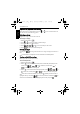
To set the date stamp:
1. Press > > Date Stamp.
2. Press or , and then select Date, Date & Time, or .
3. Press > .
Instant Review
This feature displays the still image that just recorded for 1 second.
To set the Instant Review:
1. Press > > Instant Review.
2. Press or , and then select or .
3. Press > .
During instant review, half press the shutter to return to the capture mode.
Smart Scene
Automatically selects the best shooting mode from Portrait , Landscape , Sunset
, Backlight , Backlight Portrait , Night Portrait , Night Scene ,
Snow , Text , Foliage , Macro , and Tripod (used in a low-light
environment and while the camera is held still).
1. Press > > Shooting Mode and select Smart Scene.
2. Press the shutter halfway to set automatic focus. The selected shooting mode is displayed
in the top left corner of the screen.
3. Press the shutter to capture an image.
Blink Detector
Automatically detects blinking when you capture an image.
1. Press > > Shooting Mode and select Blink Detector.
2. Press the shutter to capture an image. If blinking is detected, a warning message appears
on the screen.
3. Press / to save or discard the image, and then press to confirm.
Love Portrait
Takes a self portrait of at least two faces.
1. Press > > Shooting Mode and select Love Portrait.
2. Once faces are detected, the camera will automatically take a picture after a two-second
countdown.
During the countdown, you can press the shutter to cancel the countdown. The camera
will then start detecting faces again.
E1460_UM - EN.book Page 24 Thursday, September 23, 2010 6:43 PM