
Operation Manual




Capture mode 17
English
Manual mode
You can choose the aperture value and shutter speed in Manual mode.
To adjust values in Manual mode:
1. Go to the Capture mode with Manual mode selected.
2. Press .
3. Press / to adjust the aperture value, or / to adjust the shutter speed.
4. Press to confirm setting.
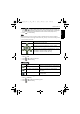
When toggling between Av/Tv, press the shutter halfway for exposure metering.
Drive mode
To select a drive mode:
1. Go to the Capture mode.
2. Press > > Drive Mode.
3. Press or , and then select a desired option.
4. Press > .
Auto Exposure Bracketing (AEB)
The AEB function automatically takes 3 pictures with slightly different settings in the
shutter speed or the aperture value.
To turn on/off AEB:
1. Go to the Capture mode.
2. Press > > AEB.
3. Press or , and then select or .
4. Press > .
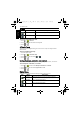
Icon Mode Description
Standard Takes one picture at a time.
Self-timer Automatically takes a picture after 2 or 10 second delay.
This mode is useful when you want to be part of the
picture.
Double Performs delay and capture twice:
1. Performs a 10-second delay, then captures the
image.
2. Performs another 2-second delay then captures the
image again.
Burst Continuously takes pictures as long as you keep
pressing the Shutter. The flash is always off in this mode.
E1250_E1280_UM - EN.book Page 17 Friday, February 5, 2010 4:44 PM