
Operation Manual




10 Operating the camera
English
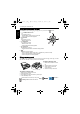
Macro mode
To select Macro mode:
1. Go to the Capture mode.
2. Keep pressing to toggle between Auto focus and Macro modes.
Drive mode
To select a drive mode:
1. Go to the Capture mode.
2. Keep pressing until the corresponding mode icon shows on the screen.
To use M-Burst:
1. Go to the Capture mode.
2. Press > > M-Burst.
3. Press > Interval, and then select an interval time.
4. Select Shots, and then choose the number of total shots.
5. Select Exit and press .
6. Press .
7. Keep pressing until the corresponding mode icon shows on the screen.
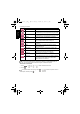
Icon Mode Description
Auto focus Adjusts focus automatically.
Macro Used when capturing images at a close distance.
Icon Mode Description
-- Standard Takes one picture at a time.
Self-timer Automatically takes a picture after 2 or 10 second delay.
This mode is useful when you want to be part of the picture.
Burst Continuously takes pictures as long as you keep pressing
the Shutter. The flash is always off in this mode.
M-Burst
Takes thumbnail shots (each shot at the VGA quality )
into one single image in the number of 2 x 2 (4 shots), 3 x 3
(9 shots), or 4 x 4 (16 shots). This function is useful when
you want to capture a continuous motion like swinging a golf
club. The flash is always off in this mode.
E1020_UM - EN.book Page 10 Tuesday, November 18, 2008 6:32 PM