
Operation Manual





Capture mode 27
English
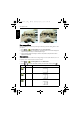
6. To take the third shot, pan the camera to the direction of the guidance arrow. Once the
screen icon overlaps the green block, the camera will automatically take the third shot.
LOMO
Creates a lomo-like effect by adding over saturated colors, dark corners, and so on.
1. Press > > Shooting Mode and select LOMO.
2. Take a picture. (The LOMO effect will be applied to this picture immediately.)
When the LOMO effect is applied, color shift (changes in colors) might occur.
Fisheye
Simulates a fisheye lens effect and creates a distorted hemisphere-like image.
1. Press > > Shooting Mode and select Fisheye.
2. Take a picture. (The Fisheye effect will be applied to this picture immediately.)
Before After
Panoramic picture previewThe camera captures the shot when the
screen icon overlaps the block
E146X_UM - EN.book Page 27 Thursday, April 21, 2011 5:54 PM