
Operation Manual





26 Capture mode
English
3. Press the shutter to capture the first shot.
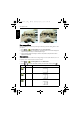
4. A guidance bar appears on top of the screen. The screen icon indicates the location of
the current screen. Pan the camera following the guidance arrow.
5. Once the screen icon overlaps the green block, the camera will automatically take the
second shot. If you will only stitch two shots, press to complete the panoramic picture.
Otherwise, proceed to the next step.
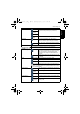
Icon Mode Description
Left-to-Right The direction of the succeeding shots will be to the right of the
first shot.
Right-to-Left The direction of the succeeding shots will be to the left of the
first shot.
Guidance bar
E146X_UM - EN.book Page 26 Thursday, April 21, 2011 5:54 PM