
Operation Manual


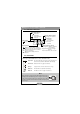

Table Of Contents

Benq DC 2110 User’s Manual
5
2.3. LCD Panel Indicator
2.4. Flash Mode
Please press the Flash Button to select the flash modes.
Auto Flash
The camera will judge the necessity of using the flash. If the
environment is too dark the flash will fire automatically.
Fill-in Flash
The flash will fire in any light circumstances.
Red-eye
Using this mode can reduce the chance of red-eye.
Reduction
The flash will set to auto flash automatically.
Flash Off
The flash won't fire in any light circumstances.
Note
When the flash is charging, the Flash LED will blink. When it stops
blinking it means the flash is charged and is ready for the shooting.
Under normal operating conditions, the charging time for the flash
is under 10 seconds. Yet if the batteries are weak, the charging time
will be longer.
Macro Mode
Macro photography
Self-timer Mode Indicator
Setting up the self-timer
Error Message
E1 : Card Error
E2 : Protected Card
000 : No Card
0 : Card Full
Flash Mode Indicator
Auto : Auto Flash
: Fill-in Flash
: Red-eyeReduction
: Flash Off
Battery Status
: Batteries are with sufficient electricity
power to support the camera's operations.
: Batteries are about to drain soon. Please
prepare new batteries.
: Batteries drained. Replace with new
batteries.
Number Of Images Stored
Recording Mode: Number of available
shots remaining
Playback Mode: Numder of images
captured
PC Connection Mode: PC connection