
Operation Manual
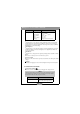

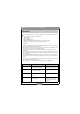


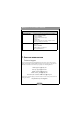
Table Of Contents

Benq DC 2110 User’s Manual
17
5. T
ROUBLESHOOTING
Symptoms Causes Solutions
The power won’t turn on • The batteries are out of power
• The AC power adapter is not
well connected or damaged
• Replace the batteries with new
ones
• Make sure the AC power is
connected and it's not damaged
The power turns off during
use
• The batteries are out of power
• Auto power off
• The memory card is taken out
when in process of saving
pictures
• The adapter has not been
connected properly
• Replace the batteries with new
ones
• Switch on the Power
• Do not remove the memory
card while you save the image
• Connect the adapter correctly
The battery power is draining
quickly
• The extemal temperature is too
cold
• The camera is using both old and
new batteries
• Keep the camera away from
extreme temperatures
• Replace all batteries with new
ones
The camera does not take pic-
tures when the shutter button
is pressed
• The camera is not set at
Recording Mode
• SmartMedia
TM
card is not
inserted
• The memory card has not been
formatted
• The memory card is damaged
• The batteries are weak
• The power has not been
switched on
• Set the Mode Dial at Recording
Mode
• After turning off the camera,
insert the card
• Initialize
• Replace the memory card with a
new one
• Replace the batteries with new
ones
• Switch on the power
The focus can not be adjusted • You have selected the incorrect
shooting mode
• If the subject is closer than 0.6m,
select macro mode and if the
subject is beyond 0.6m, select
normal mode
The flash does not fire • The camera flash is turned off • Set the flash mode to Auto Flash
or Fill-in Flash mode
Incorrect date/time is
displayed
• Reset Date/Time
Camera fails to work by any
button or switch
• Removed the batteries and
reload them
The card error indicator is on
with the memory card
inserted
• The memory is not readable or
recordable
• Format the memory card