
Operation Manual



28 System settings
English
System settings
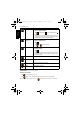
To change the system settings, tap > . Tap / to find more options.
Effect Adds special effects: Normal, LOMO, Vivid,
Sepia, B&W, Vivid Red, Vivid Green, Vivid
Blue, Color Accent (Red), Color Accent
(Green), Color Accent (Blue).
22
Icon Mode Description
Sounds - Startup Sets the boot up sound.
Sounds - Shutter Sets the shutter sound.
Sounds - Volume Sets system sounds to on or off.
Power Saving Sets the idle time before the camera enters the power-
saving mode.
LCD Saving Sets whether to save power by turning off the screen if
the camera is idle for a specific time.
-- Date & Time Sets the date and time.
-- Language Sets the displayed language on the touch screen.
File Numbering Sets the naming rule of file names.
TV Format Sets the video format (such as NTSC or PAL) when
connecting to an AV system like TV.
LCD Brightness Sets the brightness of the touch screen.
-- Manage Memory Formats the internal memory or the SD card. You can
also copy all files from the internal memory to an
inserted memory card.
T1460 UM-EN.book Page 28 Thursday, September 23, 2010 6:31 PM