
Operation Manual



26 Capture mode
English
Fisheye
Simulates a fisheye lens effect and creates a distorted hemisphere-like image.
1. Tap the top-left icon (representing the current shooting mode) from the display screen.
2. Tap > Fisheye > .
3. Take a picture. (The Fisheye effect will be applied to this picture immediately.)
Web Auction
Combines maximum 4 shots into one single image at the VGA (640 x 480) size, so it can be
quickly used in situations such as Internet auctions.
1. Tap the top-left icon (representing the current shooting mode) from the display screen.
2. Tap > Web Auction > .
Before After
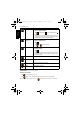
Icon Mode Description
1 shot Takes one picture only.
2 shots Takes two pictures based on the numeric order shown below:
3 shots Takes three pictures based on the numeric order shown below:
4 shots Takes four pictures based on the numeric order shown below:
T1460 UM-EN.book Page 26 Thursday, September 23, 2010 6:31 PM