
Operation Manual







BenQ DC 5530 User’s Manual
English
Using the DC E63+20
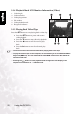
3.3.4 Playback Mode LCD Monitor Information (Video)
1. Video length
2. Video status bar
3. Video play position
4. File number
5. Video playback mode
6. Play/pause indicator
3.3.5 Playing Back Video Clips
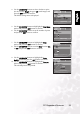
Press the SET button to start playing back a video clip.
• Press the SET button to pause and resume
video playback.
• Press the T button to stop video clip playback.
• Press the W button to start fast reverse play-
back.
• Press the X button to start fast forward play-
back.
• The zoom function cannot be activated while playing back video clips.
• To play back video clips on the computer, we recommend you to use Windows Media
Player 9.0 (WMP 9.0). You can download the latest WMP version from the website at
www.microsoft.com.
• Pressing the button in video playback mode changes the LCD display in the
sequence of: Indicators on → Indicators off.
0:000:00
0:00
Total
0:07
Total Play
Play
Play
0:07
101-0054
101-0054
1 3
5 4
2
6