
Operation Manual



BenQ DC 5530 User’s Manual
English
Using the DC E53+
19
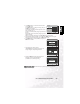
3.4.3 Playing Back a Voice File
1. Perform the steps 1~3 described under “Recording Voice
Files” on page 18..
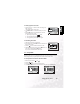
Voice playlist appears on the screen.
2. Use the S/T buttons to select the voice file you want to
play.
3. Press the OK button to start playback of the voice file
through the camera’s speaker.
• To pause playback, press the button.
• To resume playback, press the OK button.
• To stop playback, press the OK button again.
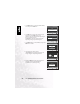
3.4.4 Deleting Voice Files
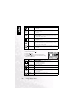
1. Make sure the camera is in Audio mode.
2. In the Audio mode, use the S/T buttons to select the voice
file you want to delete.
3. Press the button to delete the selected voice file.
4. When the delete message appears, use the W/X buttons to
select [YES], and then press the OK button.
If you wish to cancel the deletion, select [NO].
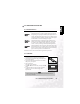
3.5 Setup Mode
This feature allows you to set up the default settings for your camera in addition to image-
related settings. Select your personal preferences for the camera with this mode.
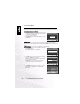
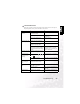
3.5.1 Setup Menus in Camera and Movie Mode
1. Slide the mode switch to [ ] or [ ].
2. Press the button.
3. Press the W/X buttons to select the [SETUP] menu.
4. Use the S/T/W/X buttons to select the desired setting, then press the OK button.
AUD_0011
W :VOLUME-
T :VOLUME+
:PAUSE
PLAY!
:STOP
:RECORD
AUD_0001
AUD_0002
:PLAY
W :VOLUME-
T :VOLUME+
SELECT FILE!
AUD_0003
NOYES
FORMAT
AUTO
DATE
AUTO
D
PICTURE
FUNCTION SETUP
SELECT ITEM:
EXIT:
SELECT PAGE:
SELECT ITEM:
MOVIE
SETUP
SELECT PAGE:
FORMAT
AUTO
DATE
AUTO
D
EXIT: