
Operation Manual






BenQ DC 5530 User’s Manual
English
Touring your DC E43
2
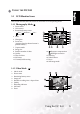
1.2.2 Rear View
1.2.3 Status LED Indicator
Color State During Power Off During Photography Connected to a PC
Green
On The completion of bat-
tery charge
AE or AF is locked with the
shutter button held halfway
down
—
Flashing Battery charging in
progress
——
Red
On Battery charging error Writing to SD card in
progress
Connected to a PC
(SD card is inserted)
Flashing — Image not in focus —
Orange
On — Flash is charging —
Flashing — Hardware malfunction SD card is not
inserted
1 2 3 4 5
6
7
8
9
10
11
16
121314
15
1. Optical Viewfinder
2. Status LED
3. Mode switch
– Playback
– Movie
– Still picture
4. Power button
5. Shutter button
6. Zoom out/Zoom in buttons
7. Menu button
8. Erase button
9. Focus/Up navigation button
10. Flash/Right navigation button
11. Battery compartment
12. SET button
13. Self-timer/Down navigation
button
14. EV compensation/Back-
light/Left navigation button
15. Display button
16. LCD panel