
User's Manual



BenQ DC 5530 User’s Manual
Touring your DC C60
2
English
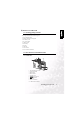
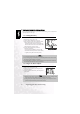
1.2.2. Rear View
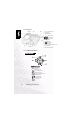
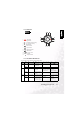
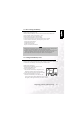
1.2.3. SET/Direction button
1. Diopter adjustment dial
2. Viewfinder
3. Viewfinder LED
4. / Zoom button
5. Speaker
6. -Menu button
7. -Display button
8. Strap holder
9. command dial
10. -Delete button
11. Tri p od s ocket
12. Battery/ SD Memory Card cover
13. LCD monitor
14. SET/Direction button
SET/Direction button
SET/Direction button:
1. SET-Set button
2. -Arrow button (up)
-Focus button/macro
3. -Arrow button (down)
-Self-timer button/interval
4. -Arrow button (left)
-Exp./back light
5. -Arrow button (right)
-Flash button