
User's Manual



BenQ DC 5530 User’s Manual
Using the DC C60
37
English
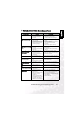
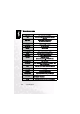
Language
Set the on-screen display language.
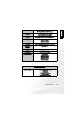
Video Output
Set the video output system according to the country in which your camera used.
System Info. (System information)
Display the camera firmware version.
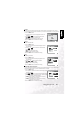
1. Press the SET button.
• The pull down menu for Language is displayed on
the LCD monitor.
2. Use the or button to select the desired OSD
language.
3. Press the SET button to confirm the setting.
1. Press the SET button.
• The pull down menu for Video Output is displayed
on the LCD monitor.
2. Use the or button to select the desired Video
Output setting.
[NTSC]: NTSC system.
[PAL]: PAL system.
3. Press the SET button to confirm the setting.
1. Press the SET button.
• The camera firmware version is displayed on the
LCD monitor.
2. To return to main menu, press the SET button.