
User's Manual



BenQ DC 5530 User’s Manual
Using the DC C60
32
English
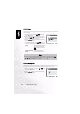
3.10.7.3. Protect
This function gives the image protection from erasing. Follow the steps below to perform the
protect functions.
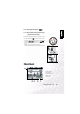
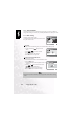
3.10.7.4. LCD Brightness
Adjust the brightness of the LCD monitor. This adjustment does not adjust the brightness of
the image to be recorded. The LCD monitor’s adjustment range is within -5 to +5.
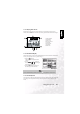
1. Select the Protect by using the or button and
press the SET button.
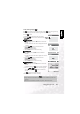
2. Protect submenu appears, including Single, All and
Select. Use the or button to select one of them
and press the SET button to confirm.
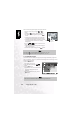
3. Use the or button to select the desired setting
and press the SET button.
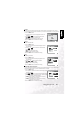
• In Single/All submenu, use the or button to
select the desired setting and press the SET button.
[Set]: The one image displayed on the
LCD monitor is locked and
[ ] is displayed on the LCD
monitor.
[Cancel Protect]: Cancel image protection.
[Exit]: Exit from the menu screen.
Set:Enter or :Select
Protect
Single
Set
Cancel Protect
Exit
Note
• If “Select” is selected, thumbnail display appears on the LCD monitor. Use the ,
, or button to select the image and press the [ ] button to select lock/
unlock and press the SET button to confirm.
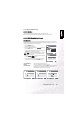
1. Select the “LCD Bright” by using the or button
and press the SET button.
2. Use the or button to select the desired setting
and press the SET button.
LCD Bright.
0