
User's Manual



BenQ DC 5530 User’s Manual
Using the DC C60
30
English
Movies cannot be displayed using the zoom playback feature.
3.10.6. Slideshow Display
The slideshow function enables you to playback your images automatically in sequential
order as a slide show. This is a very useful and entertaining feature for reviewing recorded
images and for presentation.
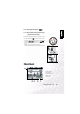
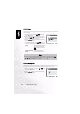
1. Adjust the zoom ratio by using the [ ] or [ ]
button.
• Pressing the [ ] button will enlarge the image.
• To return to normal magnification, press the [ ]
button.
• The image is displayed enlarged, and a white frame
and greenframe are displayed on the LCD monitor.
• The white frame indicates the entire image, while the
green frame shows the location of the currently
enlarged area.
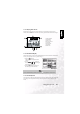
2. Use the , , or button to select the area to
enlarge.
• Adjust the display area to enlarge while viewing the
white and green frames.
3. To return to the regular display, press the [ ] button.
Entire image
Current
position of
enlargement
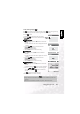
Note
•
Pressing the [ ] button magnifies the image from 1x-->2x-->4x.
• Pressing the [ ] button reduces the image from 4x-->2x-->1x.
Entire image
Current
position of
enlargement
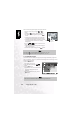
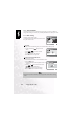
1. Press the MENU button.
• The menu screen appears.
2. Select Slide Show by using the or
button.
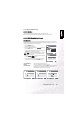
3. Press the SET button.
• The slideshow starts at 3 seconds interval
and [ ] is displayed on the LCD
monitor.
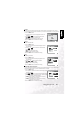
• To stop the slideshow display, press the
SET button.
Note
•
The Auto Power Off function does not operate during the slide show.