
User's Manual



BenQ DC 5530 User’s Manual
Using the DC C60
28
English
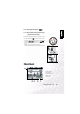
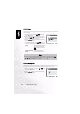
LCD Monitor Display (Playback Mode)
The [ ] Display button can switch the display on the LCD monitor when playing
back photographed images. You can switch the display to show a list of detailed
information.
1. Set the mode dial to [ ] and power on the camera.
2. Rotate the Command dial or press the or button to select the image.
3. Press the[ ] button.
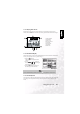
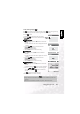
• Each press of the[ ] button switches the display format as follows:
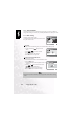
3.10.2. Voice Record
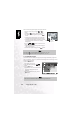
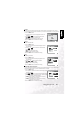
By pressing the shutter button during playing back the picture, voice may be recorded. When
pressing the shutter button down fully “VOICE RECORDING” is indicated on the LCD
monitor for 30 seconds. Pressing the shutter button down fully again “VOICE RECORD
END” is indicated.
Note
•
This function is not available for movie image playback.
Note
•
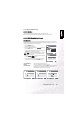
In the playback display mode, voice icon is displayed for the voice recorded picture.
• Voice record is also available at still image capture mode.
• Voice record only can be done once.