
User's Manual



BenQ DC 5530 User’s Manual
Using the DC C60
22
English
3.2. Program Mode [ P ]
The camera automatically adjusts the shutter speed and the aperture value according to
the brightness of an object. It is possible to change the white balance, the metering system
and exposure compensation in program mode.
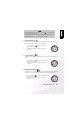
1. Set the mode dial to [P] and power on the camera.
2. Compose the picture.
3. Press the shutter button down halfway, and press it
down fully.
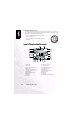
Program/TV/AV/Manual/Portrait/Sports/Night scene mode:
1. Mode icon 11. Capture mode icon
2. Focus icon 12. Self-timer icon
3. Unsteady hold warning icon 13. Possible number of shots
4. Zoom status 14. White balance icon
5. Focus area (When the shutter 15. Metering icon
button is pressed halfway.) 16. Exposure compensation
6. Voice memo 17. Shutter speed
7. Remaining battery status 18. Aperture
8. Flash icon 19. Histogram
9. Image size 20. Long time exposure mode icon
10. Quality