
User's Manual


BenQ DC 5530 User’s Manual
Using the DC C60
13
English
3.1.7. Changing the Exposure Compensation
This setting [ ] allows you to intentionally lighten or darken the entire image. Use this
setting when the optimum brightness (exposure) cannot be obtained, for example, when the
brightness between the subject and the background is not balanced or when the subject to
photograph occupies only an extremely small part of the screen.
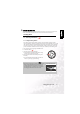
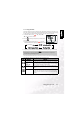
The [ ] Exposure Compensation button can select “Normal capturing mode”,
“Backlight compensation capturing mode” and “Exposure compensation adjusting mode”
cycling.
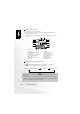
1. Set the mode dial to one of [P], [TV], [AV] and power on the camera.
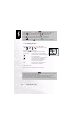
2. Toggle the [ ] button to select exposure compensation mode or backlight
compensation mode.
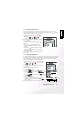
3. When exposure compensation mode is seleced, rotate the Command dial to adjust the
exposure, and press the [ ] button again to confirm.
• Rotate the Command dial to counter clockwise direction to decrease (darken) exposure,
and rotate the Command dial to clockwise direction to increase (brighten) exposure.
4. Compose the picture, press the shutter button down halfway, and press it down fully.
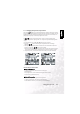
Effective Subjects and Set Values
Positive (+) Compensation
• Copying of printed text (black characters on white paper)
• Backlit portraits
• Very bright scenes (such as snowfields) and highly reflective subjects
• Shots made up predominantly of sky
Negative (-) Compensation
• Spotlit subjects, particularly against dark backgrounds
• Copying of printed text (white characters on black paper)
• Scenes with low reflectivity, such as shots of green or dark foliage
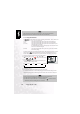
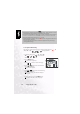
Backlight compensation
Exposure compensation