
Operation Manual





BenQ DC 5530 Bedienungsanleitung
↑⊥⁄∑
Deutsch
Bedienung der DC C60
24
1. Set the mode dial to [ AV ] and press the [ ] button.
2. Set the aperture value with the command dial.
• Turn the command dial to the side to increase the
value.
• Turn the command dial to the side to decrease the
value.
• The setting range is as follows.
F6.7/F5.6/F 4.8/F4.0/F3.5/F2.8
• The aperture and corresponding shutter speed are dis-
played on the screen. If an appropriate combination can-
not be set, the shutter speed value is displayed in red, but
photographs can be taken.halfway, then press it down
fully.
3. Compose the picture, press the shutter button down
halfway, then press it down fully.
3.5. Voller Manuellmodus [ M ]
In diesem Modus können die Werte für Blende und Belichtungszeit vor der Aufnahme
separat eingestellt werden. Der Blendenwert und die Belichtungszeit werden durch
Drehen des Befehlswählers geändert.
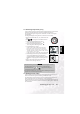
1. Setzen Sie den Moduswähler auf [ M ].
2. Wählen Sie die Belichtungszeit und die Blende mit der
Taste [ ] .
3. Stellen Sie die Belichtungszeit oder den Blendenwert mit
dem Befehlswähler ein.
4. Legen Sie sich das Bild zurecht und drücken Sie den
Auslöser erst halb, dann ganz herunter.
Hinweis
•
Der Blendenwert wird automatisch eingestellt, je nach Position des
Zoomobjektivs.