
User's Manual




BenQ DC 5530 User’s Manual
English
Using the DC C50014
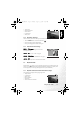
3.3.2 Playback mode LCD monitor information (video)
These indicators are displayed when playing video clips back:
1. Playback mode
2. Card indicator
3. Battery level
4. Index number of total
number
5. Video mode
6. Elapsed recording time
7. Elapsed playback
indicator
3.3.3 Playback mode - the basics
3.3.3.1 Viewing images
To play back still images one at a time:
1. Press twice the MODE button to enter Playback mode
[].
The last recorded image appears on the LCD monitor.
2. View and select your captured images by using the [ ] /
[ ] button.
• To view the previous image, press the [ ] button.
• To view the next image, press the [ ] button.
• To exit Playback mode [ ], press the MODE button.
• The print indicator [ ] only appears on the LCD monitor when the image is set to print
out.
• If there is no image stored in the internal memory or on the memory card, [No Image]
message will appear on the LCD monitor.
3.3.3.2 Magnifying images
While reviewing your images, you may enlarge a selected portion of an image. This
magnification allows you to view fine details.
1. Press twice the MODE button to enter Playback mode
[].
The last image frame appears on the LCD monitor.
2. View and select your images by using the [ ] / [ ]
button.
3. Enlarge the image by pressing the OK button.
Pressing the OK button once magnifies the image to 2X.
4. To return to the regular display from 4X-enlarged status,
press the OK button.
2 of 10
DC_C500_UM.book Page 14 Monday, August 22, 2005 10:29 AM