
User Manual


4
Broadcasting Music Using the FM Transmitter
When connected to the Joybee MP3 player, the FM Trans-
mitter can broadcast your music files to any FM radio in
range. Broadcast mode only works when the FM Trans-
mitter is connected to the Joybee.
Follow these steps to broadcast your music files using the
Joybee.
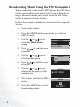
1. Turn on the Joybee.
2. Press the MODE button repeatedly to switch to
SETUP mode.
3. Use the or keys to
select the Music Share
option.
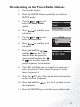
4. Press to confirm your
selection.
5. Use the or keys to
select the On option.
6. Press to confirm your
selection.
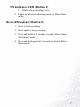
7. Use the or keys to
change the frequency of the
transmission.
8. The Joybee switches to MP3
mode.
9. Press the MODE key to exit
broadcasting mode
.
SETUP
Delete
Music Share
SETUP
Off
On
SETUP
88.1 MHz
SETUP
Set OK !