User manual
Manuals
Brands
BenQ Manuals
LED displays
BL3200PT
11
12
13
14
15
16
17
18
19
20
Table Of Contents
Copyright
Disclaimer
Power Safety
Getting started
Getting to know your monitor
Front view
Back view
Connection
How to assemble your monitor hardware
How to detach the stand and the base
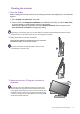
Adjusting the monitor height
Rotating the monitor
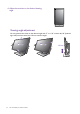
Viewing angle adjustment
Using the monitor wall mounting kit
Getting the most from your BenQ monitor
How to install the monitor on a new computer
How to upgrade the monitor on an existing computer
How to install on Windows 8 (8.1) system (selected models only)
How to install on Windows 7 system
How to adjust your monitor
The control panel
OSD Controller
Basic menu operation
Picture optimization
Customizing the hot keys
Adjusting display mode
Using Smart Scaling
Choosing an appropriate picture mode
Connecting the monitor to your MacBook series product
Navigating the main menu
Display menu
Picture menu
Picture Advanced menu
Audio menu
System menu
Ergonomics menu
Eco menu
Troubleshooting
Frequently asked questions (FAQ)
Need more help?
17
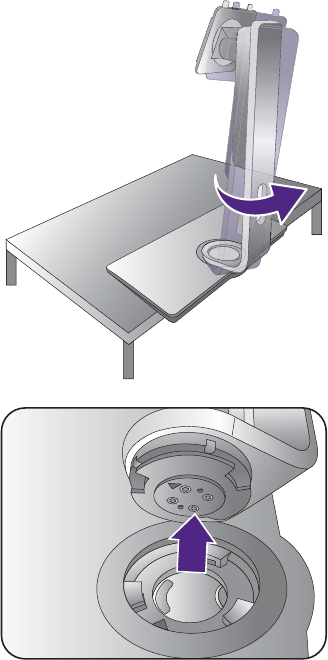
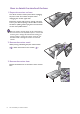
How to assemble your monitor hardw
are
T
urn the stand counter
clockwise until y
ou cannot go
fur
ther
.
And then detach the base fr
om the stand.
1
...
...
15
16
17
18
19
...
...
54