
User's Manual


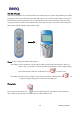

Table Of Contents

BENQ Corporation
23
3.1.2.2. Phone
When user click phone service button in the W11 main menu bar, a phone-shaped dialog box will be
popped up. Users can use the keypad on this dialog as they use a normal mobile phone. Or they can
use keyboards on their notebook or PC to enter numbers or do other operations. Users can easily
access phone book records for the numbers they want dial. They also can retrieve call records from
this scenario, which facilitate quick redial or reply.
Phone (Use it as using a normal mobile phone)
Out calling: Users can either key-in the phone number on the keyboard and press “Enter” to
make a call or use mouse to click the number keypads on the phone-shaped dialog
box to dial and then click the “Send/Answer” key
to make a call.
Incoming call: Users can press “Enter” or use mouse to click the “Send/Answer” key on
the phone-shaped dialog box to answer the incoming call.
Phone book
Users can press the left soft key
to access the Phone book. The Phone book contact list
menu will pop up and users can either search or edit the Phone book.