
User's Manual
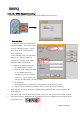



Table Of Contents

BENQ Corporation
21
Network Type
You can select from a list of supporting network types in this field. The network types displayed
will have two values as following: “Infrastructure” and “Ad-Hoc”.
Channel
This field shows the current radio channel, which is being used for an active connection. In
“Ad-Hoc” mode, please select your channel responding to other WLAN adapters you would like
to associate with. This is a non-compliant mode, which will allow W11 cards to talk to one
another without an AP regardless any SSID.
WEP
Mode:
You could active or inactive your WEP security function by selecting “On” or “Off”.
Key Length:
According to WEP function select, this page allows the entry of four keys for 64-bit or
128-bit encryption key. Each key must consist of hex digits to be written to the driver and
registry. This means that only digit number 0-9 and letters A-F are valid entries. Therefore,
if entered incorrectly, the program will not write keys to a driver.
Key 1 – Key 4:
When you want to enter the keys manually, you may use these four fields. If you wish this
node to match keys in a different vendor’s product, this may be necessary.
Key ID:
You may select one from the 4 keys you have entered to match with the AP’s WEP key.
Apply:
This button becomes active only when one of the fields has been modified. Press this
button to apply the changed values to the driver and saves them to the registry.