
User's Manual


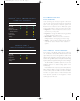
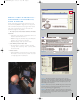
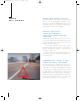
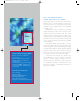
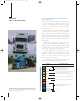
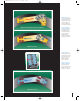

Figure 1. The Bendix
®
ACOM
TM
software fault screen organizes
information into three sections or windows. The top window identifies
location and cause. The middle window provides brief instructions for
addressing the activity. The bottom window identifies the pins in the
ECU leading to the component.
Figure 2. At the click of a mouse, ACOM
TM
diagnostics enables direct
electronic reference to a detailed, online Bendix repair manual, with
step-by-step instructions for troubleshooting.
Figure 3. The Bendix
®
ACOM
TM
software produces three-dimensional
line graphs showing comparative wheel speeds, which provide important
clues leading to the root of a problem, such as a sensor backed
away from a tone ring.
BENDIX
®
ACOM
TM
DIAGNOSTICS –
COMPREHENSIVE DIAGNOSTICS,
CLEAR DIRECTION
Simple, clear instructions allow the technician to move
fast and efficiently. ACOM
TM
diagnostics is an easy-to-use
Microsoft Internet Explorer-based program that reduces
steps in the troubleshooting process and sends the
technician straight to the problem.
• The repair process moves faster with these immediate
visual aids:
• Schematics of the vehicle’s configuration and how it
should be plumbed and wired.
• ACOM
TM
diagnostics identifies the specific ECU pins
leading to the component in question.
• Graphical display of the speed sensor data.
• Solve difficult problems faster with:
• An event history of system occurences, showing
precisely which event may have occurred, when,
and at what mph.
• Reduce returns:
• Testing individual components before or after repair.
This feature ensures that the problem has been
correctly diagnosed and addressed.
5
Figure 1.
Figure 2.
Figure 3.
407450Bendix_Guts 2/23/05 10:07 AM Page 5