
Operation Manual





114
1DYLJDWLRQRSHUDWLRQ
5HTXHVWLQJWKHSRVLWLRQ
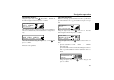
Request the destination memory (see page 107) and select
destination using the right rotary control .
If the position is outside a digitised area, the driver is guided
to the digitised route nearest to the destination. The announce-
ment "Your destination is nearby" is given. The direction of
the arrows must be followed in order to reach the destination.
6HOHFWLQJDJDPH
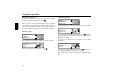
Select
from the system settings menu and confirm.
Select a game using the right rotary control .
6HWWLQJWKHODQJXDJH
Select
"Q in the system settings menu and confirm.
Select the language using the right rotary control . The lan-
guage selection is accepted by pressing the control and the
language is installed.
You can choose either a male or a female voice for certain
languages.
Select the voice using the right rotary control . The voice is
accepted and installed by pressing the control.
The system returns to the system settings menu after installa-
tion.
# !
"Q
$
@
!
M