
Operation Manual





110
1DYLJDWLRQRSHUDWLRQ
3RLQWVRILQWHUHVW32,&'
The following contains the general description of the points
of interest (or P.O.I.) CD accompanying the unit.
There are two methods of selecting a point of interest from a
points of interest (P.O.I.) CD:
- During active navigation, a point of interest can be select-
ed in the vicinity of the current position or near the entered
destination.
- If navigation is not active, points of interest can be select-
ed in the vicinity of the current position.
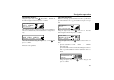
Insert the desired points of interest CD into the CD slot. After
a short time, the following display appears:
Press the right rotary control .
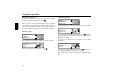
The valid categories for the current points of interest CD are
displayed.
The categories and points of interest shown in the illustrations
are examples. The actual display is dependent upon the CD
used.
Select the desired category with the right rotary control .
Then, press the right rotary control to confirm the category.
1RWH If the set user language is identical with one of the
languages available on the CD, the categories are dis-
played in this language. If there is no correspondence,
the categories are displayed in all available languag-
es. This can be recognised by the country abbrevia-
tions in front of the category.
If the points of interest CD is inserted during active naviga-
tion, the system requests information on the location of the
point of interest (near to destination or in vicinity of current
position).
If navigation is not active, this selection is skipped.
With the right rotary control , select either
or
!!.
After a short time, the available points of interest for the se-
lected categories are displayed.
J#
C;
R!I!
!!
!#
OHM
q