
Operation Manual





107
1DYLJDWLRQRSHUDWLRQ
'HVWLQDWLRQPHPRU\
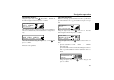
Using the right rotary control , select !Y & in
the main navigation menu and press to confirm.
The destination memory contains personally stored destinations.
Once stored, manual entry of the destination is no longer neces-
sary.
Select the destination using the right rotary control and
press to confirm.
Then start route guidance.
6SHFLDOGHVWLQDWLRQV
Menu for selecting special destinations from a specified list.
Special destinations are e. g. petrol stations, airports or hospi-
tals.
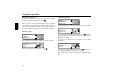
Using the right rotary control , select
YYY from the
main navigation menu and press to confirm.
Using the right rotary control , make a selection and con-
firm.
• Special destinations
F &
!!
Special destinations in the current surrounding area of the ve-
hicle or special destinations near the destination can be se-
lected.
Using the right rotary control , select a category and
press to confirm.
! !!
F
!!
HH
" !"!!!N !"!!
!!
FF
! !!
!$F"!&
!