
Operation Manual




90
>>> TELEPHONE MODE
> D
> GB
> F
> I
> E
> P
> NL
> DK
> S
> N
> FIN
> TR
> GR
> PL
> CZ
> H
> SK
Activating/deactivating automatic con-
nection
Here you can specify whether, after the
Traffic Assist is switched on, a connection
should automatically be established with
the last mobile phone connected.
> Press the Automatic connection button
in the telephone/Bluetooth settings to
activate or deactivate automatic
connection.
Refreshing the phonebook
You can instruct your Traffic Assist to
transfer the phonebook data from the mo-
bile phone again. The phonebook is then
refreshed accordingly.
> Press the Reload Phonebook button in
the telephone/Bluetooth settings.
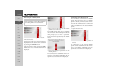
Setting the telephone volume
You can set the volume of the telephone.
> Press the
Volume button in the tele-
phone/Bluetooth settings.
> Select the desired volume using the
and buttons.
> Confirm your settings by pressing the
OK button.
Device name
You can give your Traffic Assist a name.
This name will be displayed by other
Bluetooth devices.
> Press the
Change device name button
in the telephone/Bluetooth settings.
An input menu opens.
> Enter the desired name.
Note:
The volume can also be changed using
the volume control located on the side.
See "Volume control" on page 34..
Note:
The current name is shown in brackets
on the Change device name button.