
Operation Manual



75
NAVIGATIONAL MODE >>>
> D
> GB
> F
> I
> E
> P
> NL
> DK
> S
> N
> FIN
> TR
> GR
> PL
> CZ
> H
> SK
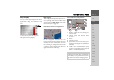
> Press the preview area while route
guidance is active and the toolbar
deactivated.
The bar display indicates the volume.
> Press or to increase or
decrease the volume.
> Press in order to mute the
announcements.
> Press again in order to cancel the
mute function.
The bar display disappears again automat-
ically after three seconds if no button is
pressed.
Additional information
At the left edge of the screen, information
(estimated time of arrival, remaining jour-
ney time and remaining distance to desti-
nation/stopover) regarding the main des-
tination and the stopover can be
displayed/hidden. The left display win-
dow shows the hidden information.
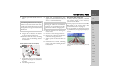
Position information
If you require information regarding a cer-
tain point on the map display, the infor-
mation window can be opened. This dis-
plays information on the selected point (if
any is stored in the map data) and pro-
vides various functions for further action.
> Move or zoom the map until you see the
desired point.
> Press and hold on the desired point un-
til the information window appears.
Make the necessary selection as necessary,
See “Navigation menu: Select on map” on
page 52.
!Warning
Always adjust the volume so that you
can still hear any ambient noise while
driving.
Note:
The volume can also be changed using
the volume control located on the side.
See "Volume control" on page 34..
Note:
Additional information can only be
switched on/off, if the option Full map
was selected in Map mode under "The
Route info key" on page 60.
1 2
1
2