
Operation Manual





83
EXTRAS >>>
> D
> GB
> F
> I
> E
> P
> NL
> DK
> S
> N
> FIN
> TR
> GR
> PL
> CZ
> H
> SK
World clock
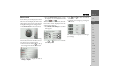
In the menu, you can display the current
time. You can also display the time in two
other regions of your choice. The time can
be displayed in digital or analogue form.
> Press
World clock in the extras menu.
A clock is displayed. As soon as a GPS sig-
nal is found, the clock will show the cor-
rect time in your current location.
> Press the button marked to call up
the settings menu for the world clock.
> Choose whether to display the clock as
Analog or Digital.
> Press the
World clock button to turn
the display of two additional world
times on or off .
When the function is turned on, three dif-
ferent times will be displayed when the
world clock is called up.
> Press
World clock settings to set which
times appear.
> Press and to enter a name for the
time description.
> Use and to select the desired
time zone.
> Confirm your settings by pressing the
OK button.
The world clock is displayed according to
your settings.
1
1
1
2
3
4
1 2
3 4