
Operation Manual





21
GENERAL OPERATION >>>
> D
> GB
> F
> I
> E
> P
> NL
> DK
> S
> N
> FIN
> TR
> GR
> PL
> CZ
> H
> SK
On the windscreen
The unit holder can be attached directly
to the windscreen using the suction mech-
anism.
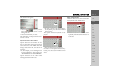
> Move the carrier plate onto the four
retaining clips of the base .
> Select a suitable spot to attach.
> Press the base with its suction sur-
face against the windscreen. Turn
the unit holder such that the carrier
plate is positioned roughly in the de-
sired viewing direction.
> Press the lever down.
The holder has attached itself firmly to the
windscreen. It can now be adjusted with
precision. In order to remove it, operate
the lever again.
Moving the unit holder
> Unscrew the fastening screw until
the carrier plate can be moved with-
out excessive force.
> Move the carrier plate to the re-
quired position and hold it in this posi-
tion.
> Tighten the fastening screw suffi-
ciently so that the Traffic Assist is held
securely in place when the vehicle is in
motion.
Attaching the Traffic Assist
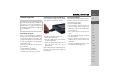
> Position the Traffic Assist, with the at-
tachment points on the bottom of the
housing, on the carrier plate .
> Press the Traffic Assist onto the carrier
plate without using excessive force
until the clip engages in the at-
tachment point.
Removing Traffic Assist
Press the clip of the unit holder with your
finger and use your free hand to take
the unit out of the unit holder.
Switching the Traffic Assist
on/off
The unit is switched on and off using the
key .
Switching on
> Press the key for a few seconds.
The unit is switched on. The manufactur-
er's logo appears on the touch screen.
5
3
3
1
2
2
4
5
5
4
5
5 6
6