
Operation Manual




59
Navigational mode
Station selection
You can select a TMC station in three
different ways: automatically or via the
station name or frequency. Press the
button at the top right of the screen to
switch between the three options.
Default setting is Automatic tuning.
Taking announcements into
consideration when calculating
routes
Your Traffic Assist Highspeed II can
take traffic announcements into
consideration when calculating a route.
You have the option of setting this
function to automatic or manual under
"The TMC button" on page 55.
Automatic recalculation
If a traffic announcement affects your
route, a new route is calculated to bypass
the problem at the earliest possible con-
venience.
Manual recalculation
If a traffic announcement affects your
route, a window with detailed
information on the traffic announcement
appears.
If you wish to calculate a detour around
the traffic problem, press Evade or
alternatively Ignore
.
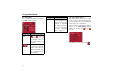
Setting Meaning
Automatic tu-
ning
The automatic station
search is active. Select a
station using the arrow
buttons.
Hold Stations preset via Auto-
matic tuning or Frequen-
cy input are tuned in un-
til you drive out of their
reception range.
Frequency in-
put
If you know the station
frequency, you can tune
into the station in this
mode using the arrow
buttons.
6072
6072
6072