
Operation Manual




54
Navigational mode
! Press a button and choose the setting
you require.
! Confirm your selection by pressing
the OK key.
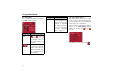
The Home adress key
Enter your Home adress to navigate au-
tomatically from any location to your
home.
! Press the Home adress button.
This opens the Home adress window.
! If no home address is entered, press
the Set button.
! To change the existing home address,
press the Change button.
The Destination selection window
opens.
! Enter your home address (see also
page 36).
! Press the Set button.
The address is copied and displayed in
the Home adress window.
! Confirm your home address with the
OK key.
This home address is now available to
the system. See "Navigation menu: Ho-
me" on page 57.
Note:
This information may only be displayed
if it is actually contained in the map ma-
terial.
Important!
Some of the information contained in
the map material may be inaccurate due
to short-term or recent changes (such as
road works, for example).
Supplying information is secondary to
the navigation system's main function,
which is traffic monitoring and sign-
posting.
6021
6021