
Operation Manual






39
>>> NAVIGATIONAL MODE
> US
Using the list of towns
If you have already entered some of the
letters of the town you want, you can use
the
List function to display all the towns
containing the combination of letters in
question.
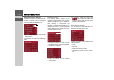
> Press the key on the bottom edge
of the screen to call up the list of towns.
> A town is selected by pressing the corre-
sponding button.
Selecting the street
In the destination street area, the street
and building number can be entered sep-
arately using a letter and numerical key
panel. A possible street is displayed each
time a new letter is entered.
Traffic Assist Highspeed rules out all im-
possible combinations of letters, and only
activates those letter boxes which will pro-
duce an existing street.
A building number can only be selected
once the street has been selected and/or if
building numbers are also present in the
data.
> Press the letters of the destination street
one after another.
The OK key
The
OK key can be used to transfer
the destination selected into the route cal-
culation menu. If the destination required
appears in the upper edge of the display
once the first letters or numbers have been
entered, you can transfer the destination
immediately with
OK without using the
list function.
> Press the
OK key to transfer your desti-
nation into the route calculation menu.
Using the list of streets
If you have already entered some of the
letters of the street you want, you can use
the
List function to display all the streets
containing the combination of letters in
question.
> Press the key on the bottom edge
of the screen to call up the list of streets.
> The street is selected by pressing the
corresponding button.
6047
5021
6008
5021