
Operation Manual






36
> US
NAVIGATIONAL MODE >>>
The Navigation menu
If you do not want to select a destination
quickly or if the planned destination is not
yet available in the destinations memory,
you can use the navigation menu to deter-
mine a new destination.
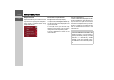
> In rapid access, press the
Navigation
menu
key at the upper edge of the
screen.
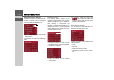
The navigation menu appears.
Structure of the navigation
menu
Address
The various steps from selecting a destina-
tion to starting route guidance can be car-
ried out using the
Address button.
• See "Navigation menu: Address" on
page 37.
Point of interest
Points of interest such as airports and ferry
ports, restaurants, hotels, gas stations, or
public buildings can be selected and route
guidance started via the
Point of interest
button.
• See "Navigation menu: Point of inter-
est" on page 41.
Select on map
With
Select on map, you can select a des-
tination directly on the map and start
route guidance.
• See "Navigation menu: Select on map"
on page 44.
Route planning
A route with several stopovers can be
planned using the
Route planning but-
ton.
• See "Navigation menu: Route plan-
ning" on page 45.
Settings
Various general settings for navigation can
be made via the
Settings button.
• See "Navigation menu: Settings" on
page 48.
6001
6002