
Operation Manual






40
1DYLJDWLRQDOPRGH
You will find information about scroll-
ing in lists in the "Scrolling through the
lists" on page 24 chapter.
3RLQWRILQWHUHVWLQDWRZQ
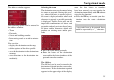
X Touch the ,QDWRZQ button.
X In the 7RZQRU3RVWFRGH box (top but-
ton) enter the town in which you want
to search for a point of interest.
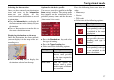
X From the $OOFDWHJRULHV box, select a
main category (e.g. culture). Only
those points of interest in the town
specified are displayed.
X Touch the box next to this and select a
sub-category (e.g. museum).
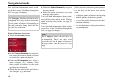
X Touch the 3RLQWRILQWHUHVW key to go to
the entry menu.
X Select the point of interest you want
from the entry menu.
You will find information about work-
ing with the entry menu in the "Entries
made with the entry menu" on page 23
chapter.
You will find information about scroll-
ing in lists in the "Scrolling through the
lists" on page 24 chapter.
Once you have selected a point of inter-
est, the keys in the lower area can be
used:
• to display points of interest on the map
• define options of the drive profile
• to save the point of interest in the des-
tinations memory
• to start directions to the point of inter-
est immediately.
1RWH
The &DWHJRU\box does not have to be
completed. It is only used to restrict the
list of points of interest. Depending on
the map currently being used, this list
may be very extensive.
6054
1RWH
The &DWHJRU\ boxes do not have to
be completed. These are only used
to restrict the list of points of interest.
In large towns, this list may be very
long.