
Operation Manual






34
1DYLJDWLRQDOPRGH
1DYLJDWLRQPHQX1DYLJDWLRQ
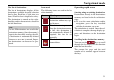
A selection window for specifying the
destination is opened from the Navigation
menu
by pressing the 1DYLJDWLRQ key.
X In the navigation menu, press the (Q
WHUGHVWLQDWLRQ button.
The destination selection window opens.
'HVWLQDWLRQVHOHFWLRQZLQGRZ
A destination can be specified in the fol-
lowing ways from the selection window.
The various stages and options are de-
scribed below.
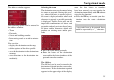
'HVWLQDWLRQVHOHFWFRXQWU\
The destination country button offers
you all the countries available for navi-
gation. Once a country has been select-
ed, it is automatically transferred into
the route calculation menu. If a destina-
tion country has already been entered,
this is entered in the first line and is
therefore valid.
X Press the destination country key to
access the selection list of countries.
The selection list appears.
X Press the key of the country you want.
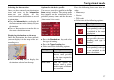
X If necessary, press the arrow keys
on the right-hand edge of the
screen to scroll through all the destina-
tion countries available.
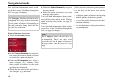
'HVWLQDWLRQVHOHFWDGGUHVVDQGVWDUW
You can enter the precise destination ad-
dress in the $GGUHVV button.
X Press the $GGUHVV key to specify the
destination in more detail.
6002
6003
6004
6004
6003
7006
6004