
Operation Manual




30
1DYLJDWLRQDOPRGH
6HOHFWLQJQDYLJDWLRQ
Navigational mode is called up from the
main menu.
X Press the 1DYLJDWLRQ key in the main
menu.
Rapid access is called up.
$LGVIRUQDYLJDWLRQ
Three aids are provided for navigation
and directions: rapid access, navigation
menu and map display.
5DSLGDFFHVV
Navigational mode always starts up with
rapid access to quickly start navigation
using destinations already saved.
1DYLJDWLRQPHQX
If necessary, the navigation menu can be
called up from rapid access, e.g. to enter
a new destination not yet provided.
0DSGLVSOD\
The map display can also be called up.
This doesn’t just display the current po-
sition but also allows a new destination
to be selected.
5DSLGDFFHVV
Rapid access allows you to select
from the key functions to quickly start
navigation. Rapid access is illustrated
below using sample destinations.
6WUXFWXUHRIUDSLGDFFHVV
1DYLJDWLRQPHQXDQGPDSGLVSOD\
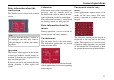
In rapid access, the Navigation menu
key for calling up this menu is displayed
in the top line on the left.
To the right of this, you will find a key
featuring a map symbol. This is used to
change over to map viewing mode.
The list of destinations is shown in the
lines under this.
3001
6001