
Instruction manual






After Sales Support TEL: 1300 766 659 33
3 ELECTRONIC PROGRAM GUIDE or EPG
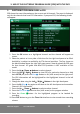
EPG shows the event information on the current and all channels. The event is displayed
only for the channels that have EPG information. If you press EPG, the
following screen
will appear
1.
Press the
OK
button on a highlighted channel and the channel will appear on
screen.
2.
Please be patient as it may take a little time for the right hand pane to be filled.
Availability is subject to availability by FTA channel providers. The Day shown on
the black window above the right light green pane is how far ahead the EPG goes
for that channel. ICE guide and other EPG providers is NOT available on this
model
3.
Press the
Up
/ Down
buttons
to select channel.
4.
Press the
Left/ Right Buttons
to view EPG of a particular channel on a daily
basis
AFTER
you press the
Blue
):
Button to Alt (shift across) to the right panel.
The EPG information will be highlighted for the Highlighted channel in the left
hand pane.
5.
Change the date using the
Left/ Right Buttons in the right hand pane.
6.
Press the
Alt
Blue
key again to shift back to the left hand pane to view another
Channel’s EPG information.
7.
Press the
Up
/ Down
buttons
to select another channel.
8.
Press the
Blue Alter
button to alter (shift across) to the program window.
9.
Press the
Green
button. for the highlighted program to be booked for
recording.
10.
Press
FAV
button to go to the
Timer List
interface to view stored timer recording
scheme.
3. USE OF THE ELECTRONIC PROGRAM GUIDE [EPG] WITH THE PVR