
Owner`s manual




6. Random Access
Video 6500K
Computer 9300K
Custom Balance
How to Start Up Picture Tuning?
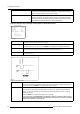
1. Push the cursor key ↑ or ↓ to highlight Color Temperature. (menu 6-31)
2. Press ENTER to select.
The Color Temperature menu will be displayed. (menu 6-32)
3. Push the cursor key ↑ or ↓ to highlight the desired Color Tem perature.
PICTURE TUNING
COLOR TEMPERATURE
GAMMA
INPUT BALANCE 1
INPUT BALANCE 2
WINDOWING
Select with ↑ or ↓
then <ENTER>
<EXIT> to return
Menu 6-31
COLOR TEMPERATURE
PROJECTOR WHITE
COMPUTER 9300K
VIDEO 6500K
FILM 5400K
BROADCAST 3200K
CUSTOM BALANCE
Select with ↑ or ↓
then <ENTER>
<EXIT> to return
Menu 6-32
How to adjust the Color Balance?
1. Adjusting the color balance by selecting a fixed color balance ?
If yes, Push the cursor key ↑ or ↓ to highlight one of the preprogrammed color balances. Press ENTER to select.
Note: Projector white will provide maximum projector light output. The c alibrated ’Broa dcast’, ’Film’, ’Video’ and ’Compu ter’
presets will provide optimum color tracking.
If no, go to step 2
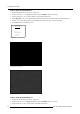
2. Push the cursor key ↑ or ↓ to adjust red and push the cursor key ← or → to adjust blue (range 0 to 255) in comparison with the
green color. (image 6-3)
Note: Even when running in Stereo Mode it is possible to pop up this barscale by pu shing the ? key on the R C U o r local keypad.
0
2.5
GAIN RED
Image 6-3
Color Balance Barscale
6.4.3 Gamma
What can be done?
With the gamma correction adjustment, it is possible to match the Gamma of the IG and the Projector.
54
R5976661 BARCO TRACE 04122003