
Owner`s manual




6. Random Access
Serial File Load
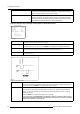
1. Push the cursor key ↑ or ↓ to highlight Serial File Load. (menu 6-29)
2. Press ENTER to toggle between [OFF] or [ON].
This Serial File Load setting is default set to [OFF].
[OFF] The Serial File Load command is set to off.
[ON] The projector is forced to load a file through RS232, all other means to load a file are disabled until Serial File
Load is set to off.
FILE OPTIONS
FILE SORT [NAME]
FILE LOAD [AUTOMATIC]
SERIAL FILE LOAD [OFF]
Select with ↑ or ↓
<ENTER> to accept
<EXIT> to return
Menu 6-29
6.4 Picture Tuning
Overview
• Starting Up Picture Tuning
• Color Temperature
• Gamma
• Input Balance 1
• Input Balance 2
• Windowing
6.4.1 Starting Up Picture Tuning
How to Start Up Picture Tuning?
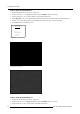
1. Push the cursor key ↑ or ↓ to highlight Picture Tuning.
2. Press ENTER to select.
The Picture Tuning menu will be displayed. (menu 6-30)
PICTURE TUNING
COLOR TEMPERATURE
GAMMA
INPUT BALANCE 1
INPUT BALANCE 2
WINDOWING
Select with ↑ or ↓
then <ENTER>
<EXIT> to return
Menu 6-30
6.4.2 Color Temperature
Available Color Temperatures
Projector White
Broadcast 3200K
Film 5400K
R5976661 BARCO TRACE 04122003
53