
Owner`s manual




6. Random Access
6.3.13 File Options
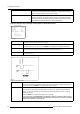
How to Start Up File Options?
1. Push the cursor key ↑ or ↓ to highlight Options. (menu 6-26)
2. Press ENTER to select.
The option selection menu will be displayed.
FILE SERVICE
LOAD
EDIT WARP1
EDIT WARP2
RENAME
COPY
DELETE
OPTIONS
Select with ↑ or ↓
then <ENTER>
<EXIT> to return
Menu 6-26
File Sort
1. Push the cursor key ↑ or ↓ to highlight File Sort. (menu 6-27)
2. Press ENTER to toggle between [NAME] or [INDEX].
This File Sort setting is default set to [NAME].
[NAME]
Thefilesinthelistwillbesortedonthefilename.
[INDEX]
The files in the list will be sorted on the file extension.
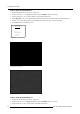
FILE OPTIONS
FILE SORT [NAME]
FILE LOAD [AUTOMATIC]
SERIAL FILE LOAD [OFF]
Select with ↑ or ↓
<ENTER> to accept
<EXIT> to return
Menu 6-27
File Load
1. Push the cursor key ↑ or ↓ to highlight File Load. (menu 6-28)
2. Press ENTER to toggle between [AUTOMATIC] or [MANUAL].
This File Load setting is default set to [AUTOMATIC].
[AUTOMATIC] The projector will automatically load the file that is best suited for the selected Input Slot.
[MANUAL]
The user will select and load the desired file.
FILE OPTIONS
FILE SORT [NAME]
FILE LOAD [AUTOMATIC]
SERIAL FILE LOAD [OFF]
Select with ↑ or ↓
<ENTER> to accept
<EXIT> to return
Menu 6-28
52 R5976661 BARCO TRACE 04122003